
imo video calls and chat HD
Baby PenguinCommunication
3.836.97K Reviews
- Version
- 9.8.000000011435
- Installs
- 10.00M
- Age Rating
- Teen
Screenshots
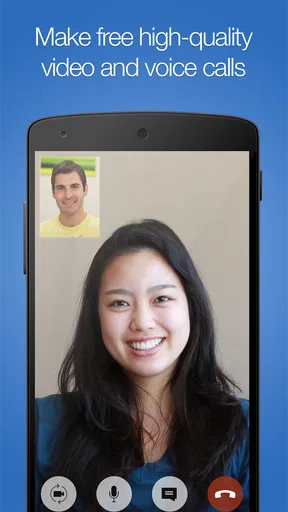
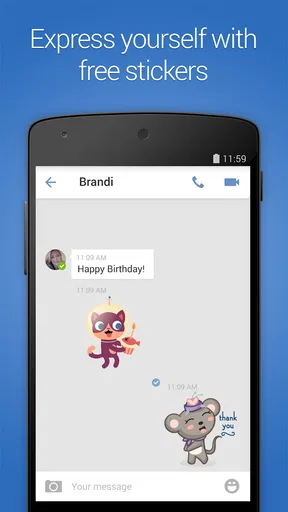
Our Review of imo video calls and chat HD
 Analysis by Appyee
When I want a straightforward way to message relatives or make a video call, I usually care less about extra social features and more about whether the first call actually works. That is where imo video calls and chat HD makes its case. It is a free communication app from Baby Penguin, aimed at everyday conversations between family members and friends rather than at professional meetings or public posting.
My overall impression is practical: it can be a useful second communication option, especially when the people I need to reach already use it. The experience is not completely frictionless, though. Problems can come from account setup, contact matching, network quality, phone permissions, or the other person’s device, and it is easy to blame the app before checking those basics. I found that a little preparation makes a bigger difference here than the store summary suggests.
Getting started without the usual confusion
The app has been available since August 27, 2018, and it supports phones running Android 5.0 or later. Its current version is 9.8.000000011435, so anyone using an older phone should first check whether the operating system meets that requirement. This is a small detail, but it explains why installation can fail or why an older handset may behave differently from a newer one.
Because this is a communication app, the first important question is not simply whether it installs. It is whether the person you want to call can be found and reached. I would install it before an important family conversation, open the account and test a message with the intended contact. Waiting until the moment of a planned call creates unnecessary pressure, particularly when one person is not comfortable changing phone settings.
The setup process can feel more complicated when users expect the app to behave exactly like the phone’s built-in calling service. It is better to think of it as a separate communication channel. The person on the other side needs to be available through the same service, and both devices need a working internet connection. If a contact does not appear immediately, I would avoid repeatedly reinstalling the app. First, I would confirm that the contact has completed setup and that both people are using the same identifying details.
Another useful habit is to check the phone’s permission prompts carefully. If the app cannot access the microphone or camera, an audio or video call may connect without the experience you expected, or the call may fail to start properly. I do not recommend granting every permission automatically. Instead, I would allow the functions needed for calling and messaging, then revisit the phone’s app settings if a feature does not work.
What to check before blaming the call
For a reliable first test, I would use a short message followed by a brief audio or video call. This separates several possible problems. If messaging works but video does not, the issue may involve camera access, the camera itself, or the connection’s ability to handle live video. If neither works, I would check the account, contact details and network before assuming the service is down.
It also helps to test in the place where the app will actually be used. A call beside the home router may work perfectly while the same call from a bedroom, balcony or moving vehicle struggles. For older relatives, I would make the first test while sitting with them and show them how to answer, switch between call types and return to the conversation if they accidentally leave the screen. That small lesson is often more valuable than explaining every menu.
The app is free to download, but it includes in-app purchases ranging from $0.99 to $199.99 per item. I would treat that information as a reason to review purchase controls on the phone, especially if a child or another family member uses the device. The basic reason most people install it is communication, so I would not assume that every optional paid item is necessary for ordinary chats or calls.
Its content rating is Teen, which is another reason I would not set it up casually on a child’s phone without discussing contacts, spending and general online communication. A Teen rating does not replace a parent’s judgment. If the phone is shared, I would also make sure the intended user understands which account is active before starting conversations.
A practical family workflow
Imagine a simple everyday situation: a parent wants to show a child a new pet while another family member is away. I would first send a message asking whether it is a good time, then start a video call rather than calling without warning. If the picture is unstable, I would turn the camera off temporarily and continue with audio while keeping the conversation alive. Once the connection improves, video can be tried again.
This message-first habit is one of the more useful ways to use the app. It reduces missed calls and gives the other person a chance to move somewhere quieter or connect to a better network. It is also helpful for relatives who are not confident with technology: a short text can explain what is about to happen, while an unexpected video request may leave them unsure which button to press.
For regular family communication, I would create a simple routine rather than relying on memory. Keep a test conversation with each important contact, send a short message before a longer call and avoid making the first call during a moment when either person is rushing. These steps are not glamorous, but they prevent the most common confusion: the app is installed, yet nobody has checked whether the right person can actually be reached.
Recovering when a call goes wrong
When a call fails, I prefer to change one thing at a time. First I check whether messages still send. Then I check the microphone and camera settings, close other apps that may be using those devices, and try again from a stable location. If the call is connected but the image freezes, I switch briefly to audio instead of repeatedly ending and restarting the call. A restart can help, but it should not be the only troubleshooting step.
There is also a difference between a call that never connects and a call that connects with poor quality. The first points me toward contact availability, account setup or permissions. The second makes me look at signal strength, Wi-Fi congestion, background downloads and the other participant’s network. Treating both symptoms as the same problem often wastes time.
If only one person cannot hear, I would ask that person to check the microphone opening, mute status and system permission. If neither person can hear, I would test another call or an ordinary recording on each phone. If the camera is the problem, I would check whether the phone’s camera works in another app. These comparisons help identify whether the issue belongs to the communication service or to the device itself.
After an update, some users may feel that familiar controls have moved or that the app needs to be opened again before everything behaves normally. My practical response would be to reopen it, confirm the account and repeat a short test call. I would avoid deleting the app as a first reaction, because reinstalling can create new sign-in or contact confusion without fixing a weak connection or blocked permission.
When the phone or network is the real problem
Video calling is demanding in a way that ordinary text messaging is not. A weak signal, crowded wireless network or phone that is already struggling with heat and battery can make the conversation unpleasant. In those situations, changing apps may not improve anything. I would move closer to the router, stop large downloads, close unnecessary applications and try audio-only communication.
The other participant’s setup matters just as much as mine. A call can look broken on my screen when the real difficulty is their unstable connection or blocked camera. I would ask simple questions rather than guessing: Can you hear me? Can you see me? Does the camera work elsewhere? Is the problem happening with every contact or only this one? Those answers quickly narrow the possibilities.
Older phones deserve special attention. Even when the operating system is supported, limited storage, low battery or a busy background process can affect a live call. I would keep the phone charged, restart it before an important conversation if it has been running for a long time, and avoid covering the microphone or camera with a case, finger or improvised stand.
Privacy and comfort are practical concerns too. I would not begin a video conversation in a place where other people can unexpectedly appear on camera, and I would explain to less experienced users how to end a call before handing the phone to somebody else. If a person mainly needs scheduled work meetings, screen sharing or formal collaboration tools, a dedicated meeting platform may be a better fit than a family-focused messenger.
How it compares with ordinary alternatives
The strongest alternative is often the communication tool that a person’s family already understands. Built-in phone calls are still better when internet access is unreliable or when the recipient does not want another account. Standard text messaging is more dependable for short notices and does not require both people to learn a new calling routine. On the other hand, a dedicated internet messenger can make it easier to keep text and video conversations together.
Compared with a professional video-conferencing service, imo feels more appropriate for informal contact. I would choose it for checking in with relatives, showing something happening at home or keeping a casual conversation going. I would not make it my first choice for a work presentation, a structured class or a call where formal meeting controls are central to the experience.
Compared with a social network, its appeal is that the purpose is clearer. I can open it intending to contact someone rather than browse a public feed. That simplicity is useful for family communication, although it also means the app is less compelling for someone who wants a broad social platform, extensive content discovery or a large public audience.
The service has reached over 10 million installs, with a 3.8 average from around 134 thousand ratings and roughly 37 thousand written reviews. Those figures suggest a sizeable user base, but they do not guarantee that every friend or relative I need is already there. The real test is local: if my important contacts use it consistently, the app becomes much more valuable; if they do not, a different option may save everyone effort.
Who will get the most from it
I think the app suits people who want a familiar place for messages and personal video calls, particularly families spread across different homes or locations. It can also help when one person prefers video for reassurance but does not need the formal features of a business meeting service. The free entry point makes it easy to try with one trusted contact before deciding whether it belongs in a larger communication routine.
I would be more cautious about recommending it to someone who needs guaranteed access during poor connectivity, who dislikes managing another account, or whose contacts are already committed to another messenger. I would also look elsewhere for advanced workplace collaboration, formal group events or situations where every participant must join without installing an additional communication app.
My best tip is to judge it through a complete workflow rather than a single successful launch. Install it, confirm the operating-system requirement, set up the intended contact, test a message, make a short call, check camera and microphone access, and then try again from the location where regular conversations will happen. That exposes practical friction early and tells me more than a quick glance at the app screen.
My final view after using it
The deciding factor is not the promise of HD video; it is whether the people I care about can connect easily and repeatedly. When the accounts, permissions and network are in order, imo provides a sensible route to everyday messaging and video conversations. Its main weakness is that setup and call quality can be blamed on the wrong component, leaving users frustrated when the real issue is the phone, contact configuration or internet connection.
I would recommend trying it for family communication, but I would set it up before the important call and keep a backup method available. Baby Penguin’s app is free, widely installed and simple enough for casual contact, while the Teen rating and optional purchases make a little supervision sensible on shared or younger users’ devices. For me, it earns a place as a practical communication option, not as a universal replacement for phone calls, text messages or professional meeting tools.
If your relatives already use it and want a low-pressure way to exchange messages and video calls, it is worth testing. If they do not, the best app is probably the one they will answer without confusion. That is the honest measure of imo: useful when it fits the family’s habits, but not automatically the right choice just because it is available.
Privacy and Permissions
See what permissions an app requests and how it handles your data.
- Identity
- add or remove accounts
- Contacts
- read your contacts
- Photos/Media/Files
- read the contents of your USB storage, modify or delete the contents of your USB storage
- Storage
- read the contents of your USB storage, modify or delete the contents of your USB storage
- Camera
- take pictures and videos
- Microphone
- record audio
- Wi-Fi connection information
- view Wi-Fi connections
- Other
- view network connections, create accounts and set passwords, pair with Bluetooth devices, send sticky broadcast, full network access, change your audio settings, control Near Field Communication, read sync settings, run at startup, draw over other apps, control vibration, prevent device from sleeping, toggle sync on and off, install shortcuts, read Google service configuration
Verdict
Strengths of imo video calls and chat HD
- Free voice and HD video calls over Wi‑Fi or mobile data.
- Group chats make it easy to stay connected with several contacts.
- Supports photo, video, voice message, and document sharing.
- Simple interface is easy for new users to navigate.
- Available on both Android and iOS devices.
Limitations of imo video calls and chat HD
- Requires a phone number to create an account.
- Some features and stickers may include in-app purchases.
- Call quality can drop noticeably on weak mobile connections.
- May request extensive permissions for contacts and media access.
- Privacy settings may require manual adjustment after installation.
Other Releases by Baby Penguin
View All
imo live
Social3.6

imo video calls and chat pro
Social2.4
Similar Picks in This Category
View All
Google Messages
Google LLC4.6

Gmail
Google LLC4.1

Google Meet
Google LLC4.4

Google Chrome
Google LLC4.1

WhatsApp Messenger
WhatsApp LLC4.6

Carrier Services
Google LLC4.2
Frequently Asked Questions
What is imo Video Calls and Chat HD?
imo Video Calls and Chat HD is a communication app for Android and iOS that lets users send messages, make voice calls, and start video calls over the internet. It is designed for one-to-one conversations and group chats, with support for sharing photos, videos, voice messages, stickers, and other media. A stable Wi-Fi or mobile data connection is required.
Is imo Video Calls and Chat HD free to use?
The app can generally be downloaded and used without paying for basic messaging, voice calls, and video calls. However, using mobile data may result in charges from your carrier, especially during long video conversations. Some optional features, advertisements, or in-app items may vary depending on the platform, country, and current version, so checking the store listing before downloading is recommended.
Does imo require a phone number to create an account?
imo commonly uses a mobile phone number for registration and account verification. After installing the app, you may be asked to enter your number and confirm it with a verification code sent by SMS or another supported method. Make sure you have access to the registered number, because verification and account recovery can depend on it.
Can I make group video calls on imo?
Yes, imo supports group communication features, including group chats and, depending on the current app version and regional availability, group voice or video calls. The quality of a group call depends on your internet connection, device performance, and the number of participants. For the smoothest experience, use a reliable Wi-Fi network and keep the app updated.
Is imo Video Calls and Chat HD safe and private?
imo includes account, contact, and privacy controls intended to help users manage communication. Nevertheless, you should review the permissions requested during installation and adjust visibility or contact settings according to your preferences. Avoid sharing verification codes, passwords, financial information, or sensitive personal content, and remember that privacy features and policies can change with future updates.
